Workflows & Use Cases
Getting Started with Pamela: From Download to First Note
Getting Started with Pamela: From Download to First Note
January 21, 2026
Getting Started with Pamela
AI-powered clinical documentation that works quietly in the background.
Pamela helps clinicians capture, document, and retrieve consultation insights without disrupting your workflow or patient relationship. No visible bots. No awkward "this meeting is being recorded" moments. Just accurate documentation that lets you stay present with your patient.
This guide walks you through downloading Pamela, setting it up, and making the most of it from your first consultation.
Downloading the app
Pamela is available for MacOS and Windows as a lightweight desktop application. Installation takes less than two minutes.
Once downloaded, Pamela lives in your system tray or menu bar, ready when you are.
During setup, you'll grant permission for microphone access. This is essential for accurate transcription. All data is processed in a privacy-first, GDPR-compliant manner, with full NEN 7510 and ISO 27001 certification.
Initial setup and onboarding
The onboarding flow begins immediately after installation:
Select your recording method — microphone for in-person consultations, or system audio for telehealth calls
Set your language preferences — Pamela supports over 36 languages out of the box
Choose your specialty templates — LOINC-based templates tailored to psychiatry, cardiology, internal medicine, and more
Connect your EHR (optional) — direct API integration or use copy-paste to start
This setup tailors Pamela to your clinical workflow from the very beginning.
Using Pamela during a consultation
To start documenting, simply begin your consultation as usual whether in-person, via video call, or telehealth platform.
Click "Start Pamela."
Unlike other AI scribes, Pamela doesn't announce itself or join as a visible participant. It listens quietly through your microphone and documents in the background. A subtle indicator lets you know it's running without distracting you or your patient.
You stay focused on the patient. Pamela handles the notes.
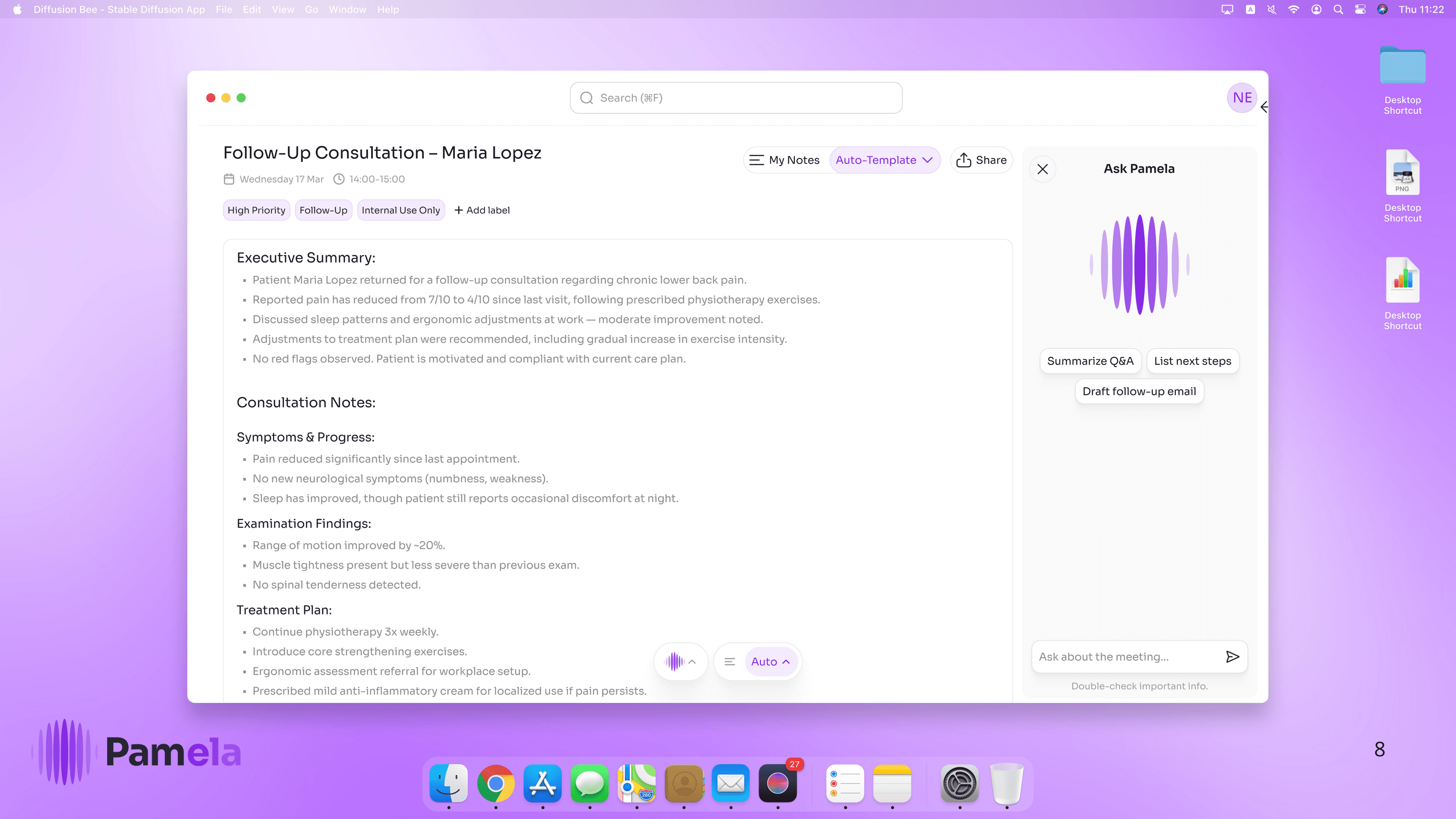
As the consultation unfolds, you see your documentation taking shape in real-time. Add your own observations. Restructure sections. Include clinical reasoning the conversation didn't capture. You're not reviewing AI output afterwards, you're shaping the note as it happens.
After the consultation: Your notes, ready to review
Once your consultation ends, Pamela delivers a structured clinical note containing:
Key findings and symptoms discussed
Clinical observations and examination results
Assessment and diagnosis
Treatment plan and follow-up actions
Patient instructions
Notes are formatted according to your specialty templates and ready for your EHR. Export directly via API integration, or copy-paste into your system.
Everything is searchable and organised, making documentation and follow-up significantly easier.
Using AskPam to retrieve patient insights
Pamela isn't just a documentation tool it's your clinical knowledge assistant.
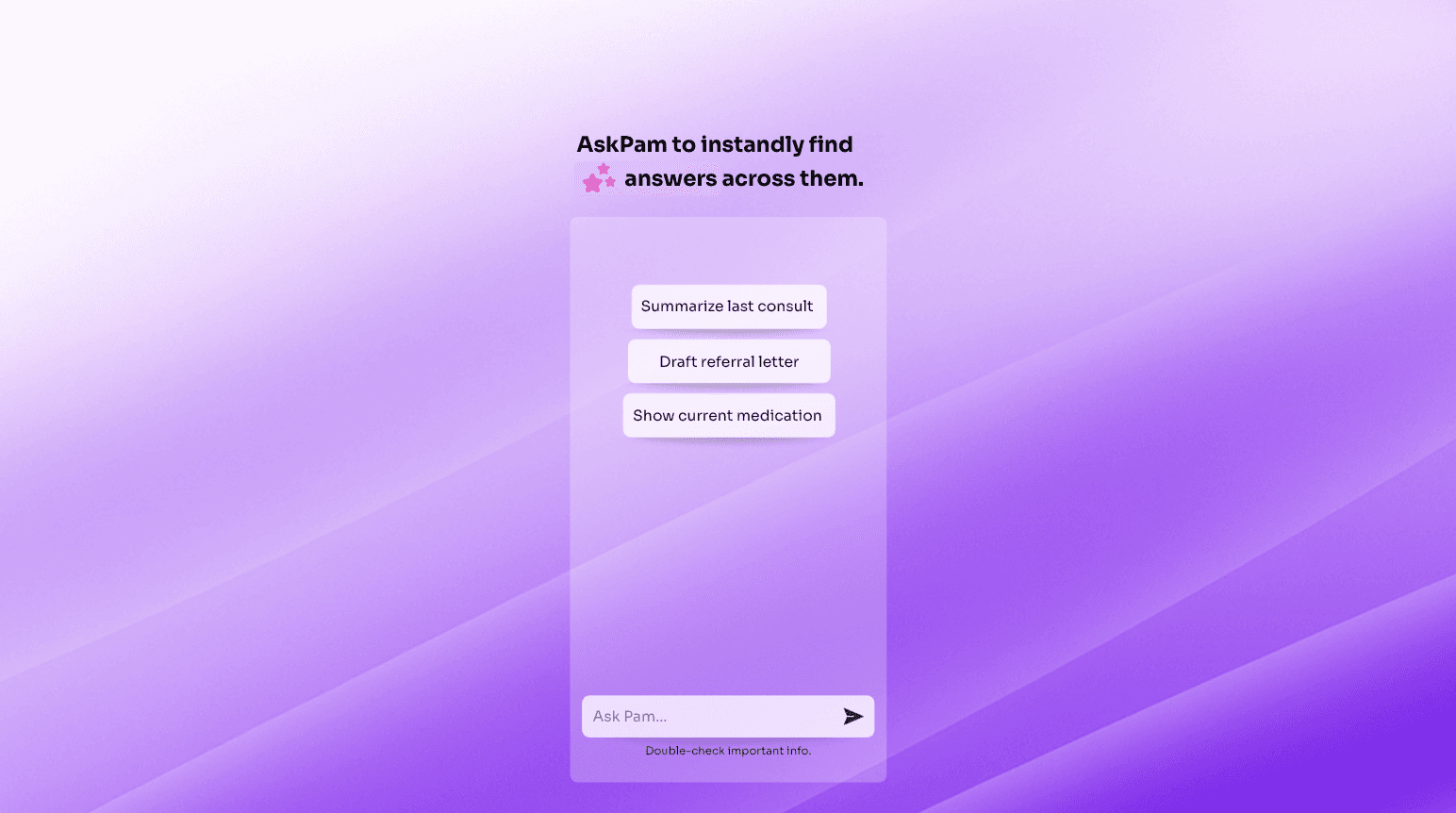
With AskPam, you can query patient records and past consultations in natural language:
"What was this patient's last HbA1c?"
"Summarise their psychiatric history"
"What medications have they tried for hypertension?"
"When did they last see cardiology and what was recommended?"
AskPam turns Pamela into an extension of your memory surfacing key information instantly without clicking through EHR tabs or scrolling through years of notes.
Privacy and compliance
All of Pamela's features are built with healthcare privacy requirements in mind:
GDPR compliant — your data stays protected under European privacy law
NEN 7510 certified — meeting Dutch healthcare information security standards
ISO 27001 certified — international security best practices
EU data residency — all data processed and stored within Europe
No third-party training — your patient data is never used to train external AI models
Whether you're in a hospital, private practice, or mental health clinic, Pamela offers peace of mind without compromising functionality.
Get started in minutes
Getting started with Pamela is simple, secure, and fast.
In just a few steps, you'll have an AI-powered documentation assistant that works in any consultation setting, in over 36 languages, and doesn't require bots, calendar invites, or patient-facing disruptions.
From real-time documentation to instant patient history retrieval, Pamela streamlines how you capture and act on clinical information, freeing you to stay present with your patients.
Getting Started with Pamela
AI-powered clinical documentation that works quietly in the background.
Pamela helps clinicians capture, document, and retrieve consultation insights without disrupting your workflow or patient relationship. No visible bots. No awkward "this meeting is being recorded" moments. Just accurate documentation that lets you stay present with your patient.
This guide walks you through downloading Pamela, setting it up, and making the most of it from your first consultation.
Downloading the app
Pamela is available for MacOS and Windows as a lightweight desktop application. Installation takes less than two minutes.
Once downloaded, Pamela lives in your system tray or menu bar, ready when you are.
During setup, you'll grant permission for microphone access. This is essential for accurate transcription. All data is processed in a privacy-first, GDPR-compliant manner, with full NEN 7510 and ISO 27001 certification.
Initial setup and onboarding
The onboarding flow begins immediately after installation:
Select your recording method — microphone for in-person consultations, or system audio for telehealth calls
Set your language preferences — Pamela supports over 36 languages out of the box
Choose your specialty templates — LOINC-based templates tailored to psychiatry, cardiology, internal medicine, and more
Connect your EHR (optional) — direct API integration or use copy-paste to start
This setup tailors Pamela to your clinical workflow from the very beginning.
Using Pamela during a consultation
To start documenting, simply begin your consultation as usual whether in-person, via video call, or telehealth platform.
Click "Start Pamela."
Unlike other AI scribes, Pamela doesn't announce itself or join as a visible participant. It listens quietly through your microphone and documents in the background. A subtle indicator lets you know it's running without distracting you or your patient.
You stay focused on the patient. Pamela handles the notes.
As the consultation unfolds, you see your documentation taking shape in real-time. Add your own observations. Restructure sections. Include clinical reasoning the conversation didn't capture. You're not reviewing AI output afterwards, you're shaping the note as it happens.
After the consultation: Your notes, ready to review
Once your consultation ends, Pamela delivers a structured clinical note containing:
Key findings and symptoms discussed
Clinical observations and examination results
Assessment and diagnosis
Treatment plan and follow-up actions
Patient instructions
Notes are formatted according to your specialty templates and ready for your EHR. Export directly via API integration, or copy-paste into your system.
Everything is searchable and organised, making documentation and follow-up significantly easier.
Using AskPam to retrieve patient insights
Pamela isn't just a documentation tool it's your clinical knowledge assistant.
With AskPam, you can query patient records and past consultations in natural language:
"What was this patient's last HbA1c?"
"Summarise their psychiatric history"
"What medications have they tried for hypertension?"
"When did they last see cardiology and what was recommended?"
AskPam turns Pamela into an extension of your memory surfacing key information instantly without clicking through EHR tabs or scrolling through years of notes.
Privacy and compliance
All of Pamela's features are built with healthcare privacy requirements in mind:
GDPR compliant — your data stays protected under European privacy law
NEN 7510 certified — meeting Dutch healthcare information security standards
ISO 27001 certified — international security best practices
EU data residency — all data processed and stored within Europe
No third-party training — your patient data is never used to train external AI models
Whether you're in a hospital, private practice, or mental health clinic, Pamela offers peace of mind without compromising functionality.
Get started in minutes
Getting started with Pamela is simple, secure, and fast.
In just a few steps, you'll have an AI-powered documentation assistant that works in any consultation setting, in over 36 languages, and doesn't require bots, calendar invites, or patient-facing disruptions.
From real-time documentation to instant patient history retrieval, Pamela streamlines how you capture and act on clinical information, freeing you to stay present with your patients.
Getting Started with Pamela
AI-powered clinical documentation that works quietly in the background.
Pamela helps clinicians capture, document, and retrieve consultation insights without disrupting your workflow or patient relationship. No visible bots. No awkward "this meeting is being recorded" moments. Just accurate documentation that lets you stay present with your patient.
This guide walks you through downloading Pamela, setting it up, and making the most of it from your first consultation.
Downloading the app
Pamela is available for MacOS and Windows as a lightweight desktop application. Installation takes less than two minutes.
Once downloaded, Pamela lives in your system tray or menu bar, ready when you are.
During setup, you'll grant permission for microphone access. This is essential for accurate transcription. All data is processed in a privacy-first, GDPR-compliant manner, with full NEN 7510 and ISO 27001 certification.
Initial setup and onboarding
The onboarding flow begins immediately after installation:
Select your recording method — microphone for in-person consultations, or system audio for telehealth calls
Set your language preferences — Pamela supports over 36 languages out of the box
Choose your specialty templates — LOINC-based templates tailored to psychiatry, cardiology, internal medicine, and more
Connect your EHR (optional) — direct API integration or use copy-paste to start
This setup tailors Pamela to your clinical workflow from the very beginning.
Using Pamela during a consultation
To start documenting, simply begin your consultation as usual whether in-person, via video call, or telehealth platform.
Click "Start Pamela."
Unlike other AI scribes, Pamela doesn't announce itself or join as a visible participant. It listens quietly through your microphone and documents in the background. A subtle indicator lets you know it's running without distracting you or your patient.
You stay focused on the patient. Pamela handles the notes.
As the consultation unfolds, you see your documentation taking shape in real-time. Add your own observations. Restructure sections. Include clinical reasoning the conversation didn't capture. You're not reviewing AI output afterwards, you're shaping the note as it happens.
After the consultation: Your notes, ready to review
Once your consultation ends, Pamela delivers a structured clinical note containing:
Key findings and symptoms discussed
Clinical observations and examination results
Assessment and diagnosis
Treatment plan and follow-up actions
Patient instructions
Notes are formatted according to your specialty templates and ready for your EHR. Export directly via API integration, or copy-paste into your system.
Everything is searchable and organised, making documentation and follow-up significantly easier.
Using AskPam to retrieve patient insights
Pamela isn't just a documentation tool it's your clinical knowledge assistant.
With AskPam, you can query patient records and past consultations in natural language:
"What was this patient's last HbA1c?"
"Summarise their psychiatric history"
"What medications have they tried for hypertension?"
"When did they last see cardiology and what was recommended?"
AskPam turns Pamela into an extension of your memory surfacing key information instantly without clicking through EHR tabs or scrolling through years of notes.
Privacy and compliance
All of Pamela's features are built with healthcare privacy requirements in mind:
GDPR compliant — your data stays protected under European privacy law
NEN 7510 certified — meeting Dutch healthcare information security standards
ISO 27001 certified — international security best practices
EU data residency — all data processed and stored within Europe
No third-party training — your patient data is never used to train external AI models
Whether you're in a hospital, private practice, or mental health clinic, Pamela offers peace of mind without compromising functionality.
Get started in minutes
Getting started with Pamela is simple, secure, and fast.
In just a few steps, you'll have an AI-powered documentation assistant that works in any consultation setting, in over 36 languages, and doesn't require bots, calendar invites, or patient-facing disruptions.
From real-time documentation to instant patient history retrieval, Pamela streamlines how you capture and act on clinical information, freeing you to stay present with your patients.
Getting Started with Pamela
AI-powered clinical documentation that works quietly in the background.
Pamela helps clinicians capture, document, and retrieve consultation insights without disrupting your workflow or patient relationship. No visible bots. No awkward "this meeting is being recorded" moments. Just accurate documentation that lets you stay present with your patient.
This guide walks you through downloading Pamela, setting it up, and making the most of it from your first consultation.
Downloading the app
Pamela is available for MacOS and Windows as a lightweight desktop application. Installation takes less than two minutes.
Once downloaded, Pamela lives in your system tray or menu bar, ready when you are.
During setup, you'll grant permission for microphone access. This is essential for accurate transcription. All data is processed in a privacy-first, GDPR-compliant manner, with full NEN 7510 and ISO 27001 certification.
Initial setup and onboarding
The onboarding flow begins immediately after installation:
Select your recording method — microphone for in-person consultations, or system audio for telehealth calls
Set your language preferences — Pamela supports over 36 languages out of the box
Choose your specialty templates — LOINC-based templates tailored to psychiatry, cardiology, internal medicine, and more
Connect your EHR (optional) — direct API integration or use copy-paste to start
This setup tailors Pamela to your clinical workflow from the very beginning.
Using Pamela during a consultation
To start documenting, simply begin your consultation as usual whether in-person, via video call, or telehealth platform.
Click "Start Pamela."
Unlike other AI scribes, Pamela doesn't announce itself or join as a visible participant. It listens quietly through your microphone and documents in the background. A subtle indicator lets you know it's running without distracting you or your patient.
You stay focused on the patient. Pamela handles the notes.
As the consultation unfolds, you see your documentation taking shape in real-time. Add your own observations. Restructure sections. Include clinical reasoning the conversation didn't capture. You're not reviewing AI output afterwards, you're shaping the note as it happens.
After the consultation: Your notes, ready to review
Once your consultation ends, Pamela delivers a structured clinical note containing:
Key findings and symptoms discussed
Clinical observations and examination results
Assessment and diagnosis
Treatment plan and follow-up actions
Patient instructions
Notes are formatted according to your specialty templates and ready for your EHR. Export directly via API integration, or copy-paste into your system.
Everything is searchable and organised, making documentation and follow-up significantly easier.
Using AskPam to retrieve patient insights
Pamela isn't just a documentation tool it's your clinical knowledge assistant.
With AskPam, you can query patient records and past consultations in natural language:
"What was this patient's last HbA1c?"
"Summarise their psychiatric history"
"What medications have they tried for hypertension?"
"When did they last see cardiology and what was recommended?"
AskPam turns Pamela into an extension of your memory surfacing key information instantly without clicking through EHR tabs or scrolling through years of notes.
Privacy and compliance
All of Pamela's features are built with healthcare privacy requirements in mind:
GDPR compliant — your data stays protected under European privacy law
NEN 7510 certified — meeting Dutch healthcare information security standards
ISO 27001 certified — international security best practices
EU data residency — all data processed and stored within Europe
No third-party training — your patient data is never used to train external AI models
Whether you're in a hospital, private practice, or mental health clinic, Pamela offers peace of mind without compromising functionality.
Get started in minutes
Getting started with Pamela is simple, secure, and fast.
In just a few steps, you'll have an AI-powered documentation assistant that works in any consultation setting, in over 36 languages, and doesn't require bots, calendar invites, or patient-facing disruptions.
From real-time documentation to instant patient history retrieval, Pamela streamlines how you capture and act on clinical information, freeing you to stay present with your patients.

“Pamela gives me clarity after every consult. I don’t need to type everything myself. It's all there, structured and searchable.” — Dr. M. van der Veen